

How DriveWorks Speeds Up Quoting: What’s Actually Happening Behind the Scenes
 In last week’s post, we looked at what DriveWorks is and why it matters. Now, let’s look more closely at how it works in practice.
For many manufacturers, quoting takes too long because too much of the process still depends on manual work. Sales has to check with engineering. Engineering has to confirm rules and compatibility. Then someone has to build pricing, create documents, and prepare data for production. As a result, what should be a fast response often turns into delays, bottlenecks, and avoidable rework.
DriveWorks changes that by turning product knowledge into an automated workflow. Instead of rebuilding the quote process every time, your team can follow a repeatable system that applies rules, updates pricing, generates outputs, and moves the opportunity forward faster.
Here are the core ways DriveWorks speeds up quoting for your team.
1. Capture the rules once and use them again and again
First, DriveWorks helps you capture product rules in one place. These rules can include geometry, fit and clearance limits, option compatibility, and manufacturing constraints.
Instead of asking engineering to review those requirements for every quote, DriveWorks applies the rules automatically during configuration. That means the system checks validity as the quote is built.
Why that matters:
Your team spends less time going back to engineering, and quotes start out technically valid.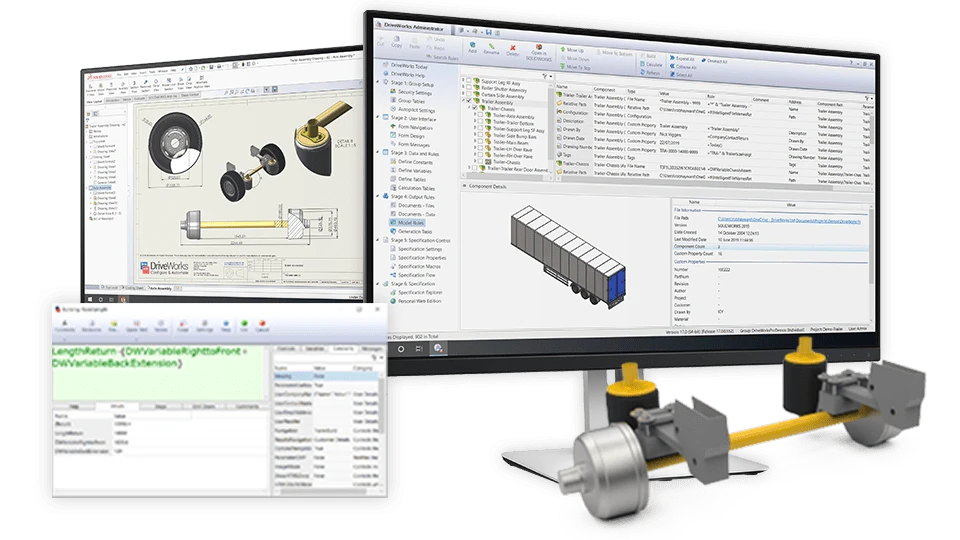
2. Build real-time pricing into the configurator
Next, DriveWorks can connect pricing logic directly to the configuration process. That can include cost rollups, option-based price changes, volume discounts, and lead-time surcharges.
As users change product options, DriveWorks recalculates pricing immediately. So, instead of waiting for manual review, sales teams and customers can see updated totals and line-item pricing right away.
Why that matters:
You can respond faster with accurate pricing and reduce delays caused by finance or manual calculations.
3. Generate BOMs, drawings, and manufacturing data automatically
Once a configuration is complete, DriveWorks can generate the outputs needed to support both the quote and the next step in the process. That includes bills of materials, SOLIDWORKS models, drawings, cut lists, and NC data.
Because those outputs match the selected configuration, production teams do not need to spend as much time checking details or requesting clarification later.
Why that matters:
The gap between “quote accepted” and “ready for production” gets much smaller.
4. Give users guided, web-based configurators with DriveWorks Live
DriveWorks Live extends the quoting process beyond internal teams. Sales reps, dealers, and even customers can configure products through a web-based interface from almost any device.
At the same time, DriveWorks keeps the process guided and controlled. Users move through forms, prompts, and visual previews that help them choose valid options.
Why that matters:
You can support faster self-service quoting while reducing manual intervention from your internal team.
5. Automate quote documents and templates
In addition to configuring products, DriveWorks can also build the quote package itself. It can automatically populate proposal PDFs, terms and conditions, drawings, compliance documents, and other supporting materials.
That removes the need to manually gather files, copy information into templates, or double-check consistency across documents.
Why that matters:
Your team can deliver polished, professional quote packages much faster and with fewer errors.
6. Connect approvals and business systems
DriveWorks also helps move quote data into the systems your business already uses. It can integrate with CRM, ERP, and other platforms to push pricing, BOMs, and quote details directly into quoting, order management, and approval workflows.
As a result, many approval steps that once depended on email chains or phone calls can become automated or at least much easier to manage.
Why that matters:
Approvals move faster, and your team spends less time on administrative follow-up.
7. Run batch quoting with Autopilot
Finally, DriveWorks can help when you need to generate a large number of quotes at once. For example, if you are preparing a bid package or building a price book, DriveWorks can run those jobs automatically.
With batch automation and Autopilot, the system can generate hundreds or even thousands of quotes, drawings, and price sheets without constant user involvement.
Why that matters:
Large quoting projects that once took days of manual work can often run overnight.
The bigger takeaway
What makes DriveWorks so effective is not just one feature. It is the way all of these capabilities work together.
When product rules, pricing, CAD automation, documentation, and approvals all connect in one workflow, quoting becomes faster, more consistent, and much easier to scale. Instead of relying on manual effort at every step, your team can move opportunities forward with far less friction.
That is especially valuable for manufacturers with complex, configurable products. In those environments, even small delays in quoting can slow the sales cycle and create extra work downstream. DriveWorks helps remove those delays by turning quoting into a repeatable process rather than a custom effort every time.
Bottom line
DriveWorks speeds up quoting by reducing handoffs, automating repetitive tasks, and making sure every quote starts with valid product logic. It gives sales teams faster answers, gives engineering fewer interruptions, and helps the business move from quote to order with greater confidence.
For companies that want to improve quote speed without sacrificing accuracy, DriveWorks can make a major difference.




